
vue3 项目中使用 i18n 国际化
更新: 9/4/2025字数: 0 字 时长: 0 分钟
1. 安装 vue-i18n
js
npm install vue-i18n2. 创建 i18n 文件夹
创建一下文件,并进行相关配置。
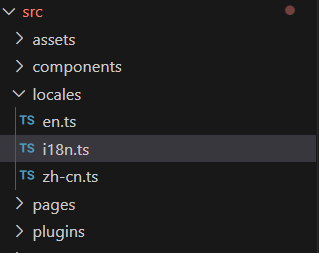
1,在 src 目录下,新建 locales 文件夹
2,在 locales 文件夹中,新建 en.ts 、zh-cn.ts、i18n.ts 文件
en.ts:英文内容
js
export default {
  button: {
    confirm: "Confirm",
    login: "Login"
  }
};zh-cn.ts:中文内容
js
export default {
  button: {
    confirm: "确认",
    login: "登录"
  }
};i18n.ts: i18n 的相关配置内容
js
// i18n配置
import { createI18n } from "vue-i18n";
import zhCn from "./zh-cn";
import en from "./en";

// 创建i18n
const i18n = createI18n({
  locale: localStorage.getItem("language") || "zhCn", // 语言标识
  globalInjection: true, // 全局注入,可以直接使用$t
  // 处理报错: Uncaught (in promise) SyntaxError: Not available in legacy mode (at message-compiler.esm-bundler.js:54:19)
  legacy: false,
  messages: {
    zhCn,
    en
  }
})

export default i18n;3. 在main.ts中全局引入
js
import i18n from './locales/i18n'; // i18n的配置文件路径,也就是 createI18n 的文件地址
createApp(App).use(i18n).mount('#app')4. 使用
1, 在 <template>中可以直接使用$t
js
<template>
	<div>
		<el-button type="primary" @click="toLogin">{{ $t('button.login') }}</el-button>
	</div>
</template>2, 在js中使用
js
import { useI18n} from 'vue-i18n';

const { t } = useI18n();
function login () {
  alert(t('button.login'));
}5. 报错 legacy 属性
在vite脚手架项目当中,使用vue-i18n插件进行国际化多语言时,报错;
报错
Uncaught SyntaxError: Not available in legacy mode
5.1 问题分析
当前的vue-i18n 版本为
js
“vue-i18n”: “^9.8.0”,vue-i18n的8.x版本支持vue2.x和vue3.x
vue-i18n的9.x版本主要支持vue3.x
vue3中允许使用 Options API (legacy mode)和 Composition API 模式
但是vue-i18n的9.x版主不允许混合使用这两种模式,所以需根据vue3采用的模式来确定vue-i18n使用的模式
5.2 解决方案
1.回退vue-i18n的版本(不推荐)
2.指定vue-i18n的使用模式 在i18n的配置文件中,设置vue-i18n为Composition API 模式
js
allowComposition: true,js
const i18n = createI18n({
  locale: localStorage.getItem("language") || "zhCn", // 语言标识
  globalInjection: true, // 全局注入,可以直接使用$t
  allowComposition: true,
  messages: {
    zhCn,
    en
  }
})3.设置legacy: false
js
const i18n = createI18n({
  locale: localStorage.getItem("language") || "zhCn", // 语言标识
  legacy: false,
  messages: {
    zhCn,
    en
  }
})