
TypeScript 中的 Record 类型详解
更新: 1/12/2026字数: 0 字 时长: 0 分钟
Record 是 TypeScript 提供的一个非常实用的工具类型,用于构建一个对象类型,其中的 键 是一种特定的类型,而 值 则是另一种特定的类型。它可以让你快速创建一个映射类型,并确保每个键值对符合预期的类型。
1. 基本语法
Record<Keys, Type>;Keys:对象的键的类型(通常是一个联合类型)。这可以是任何基本类型、字符串、数字或符号,甚至是一个具体的字面量类型。Type:对象每个键对应的值的类型。
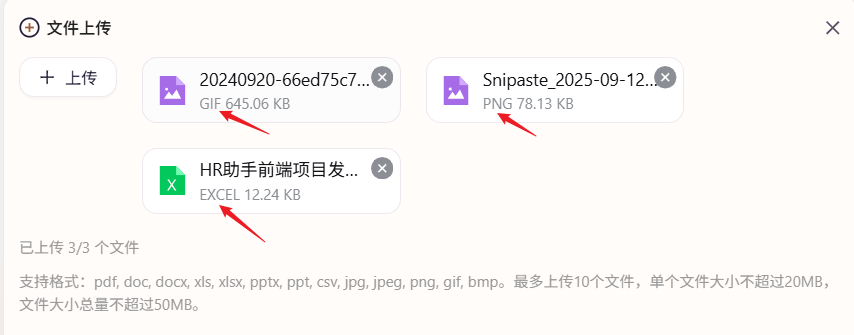
这是一个通过 MIME 文件类型映射成所需要的字符串的示例:
例如:
把 application/vnd.openxmlformats-officedocument.spreadsheetml.sheet 映射成 EXCEL
把application/vnd.openxmlformats-officedocument.presentationml.presentation 映射成 PPT
const MIME_MAP: Record<string, string> = {
  "application/vnd.openxmlformats-officedocument.spreadsheetml.sheet": "EXCEL",
  "application/vnd.ms-excel": "EXCEL",
  "application/vnd.openxmlformats-officedocument.wordprocessingml.document": "WORD",
  "application/vnd.ms-word": "WORD",
  "application/vnd.openxmlformats-officedocument.presentationml.presentation": "PPT",
  "application/vnd.ms-powerpoint": "PPT",
  "application/pdf": "PDF",
  "image/png": "PNG",
  "image/jpeg": "JPG",
  "image/jpg": "JPG",
  "image/gif": "GIF",
  "image/svg+xml": "SVG",
  "text/plain": "TXT",
  "text/csv": "CSV",
  "application/zip": "ZIP",
  "application/json": "JSON"
};

/**
 * 友好型 MIME → 短名称
 * @param mime MIME 类型
 * @param fallback 找不到时回退为文件后缀(不含点)
 * @returns 大写短格式,如 EXCEL / PDF / PNG
 */
export function mimeToShort(mime: string, fallback: string = "UNKNOWN"): string {
  return MIME_MAP[mime.toLowerCase()] ?? fallback.toUpperCase();
}

/* 测试 */
console.log(mimeToShort("application/vnd.openxmlformats-officedocument.spreadsheetml.sheet")); // EXCEL
console.log(mimeToShort("image/png")); // PNG
console.log(mimeToShort("application/octet-stream", "bin")); // BIN效果如图所示:
2. 示例
2.1 创建一个对象类型的映射
例如,如果你需要创建一个对象,键是 string 类型,而值是 number 类型:
type StringToNumber = Record<string, number>;

const example: StringToNumber = {
  a: 1,
  b: 2,
  c: 3
};

console.log(example);在这个例子中,Record<string, number> 使得我们创建的对象 example 的键必须是 string 类型,且每个键对应的值必须是 number 类型。
2.2 使用字面量类型作为键
你还可以使用字面量类型作为键。例如,我们可以定义一个对象,其键是固定的字符串(比如 "name" 和 "age"),值的类型是 string 和 number。
type Person = Record<"name" | "age", string | number>;

const person: Person = {
  name: "Alice",
  age: 30
};

console.log(person);在这个例子中,Record<"name" | "age", string | number> 表示一个对象,其键只能是 "name" 或 "age",对应的值可以是 string 或 number。
2.3 键为枚举类型
你还可以使用枚举类型作为 Keys,这样能够让键的类型更加明确和可控。
enum Role {
  Admin = "admin",
  User = "user"
}

type RolePermissions = Record<Role, boolean>;

const permissions: RolePermissions = {
  [Role.Admin]: true,
  [Role.User]: false
};

console.log(permissions);在这个例子中,Record<Role, boolean> 确保了 permissions 对象的键只能是 Role.Admin 或 Role.User,且它们的值是 boolean 类型。
3. 常见用法
3.1 将多个属性值映射到单一类型
Record 很适合用来将多个属性的键映射到相同的类型。比如我们需要创建一个对象,里面的所有属性都是 boolean 类型:
type Flags = Record<"isAdmin" | "isActive" | "isVerified", boolean>;

const userFlags: Flags = {
  isAdmin: true,
  isActive: true,
  isVerified: false
};在这个例子中,Flags 类型将 "isAdmin"、"isActive"、"isVerified" 这些固定的字符串键映射为 boolean 类型的值。
3.2 动态生成对象类型
如果你有一组动态的键,并且希望为每个键设置一个统一的类型,可以使用 Record 来快速生成对象类型:
const keys = ["name", "age", "email"] as const;
type UserKeys = (typeof keys)[number]; // "name" | "age" | "email"

type User = Record<UserKeys, string>;

const user: User = {
  name: "Alice",
  age: "30", // age 是字符串类型
  email: "alice@example.com"
};在这个例子中,我们通过 keys 数组的类型推导得到了一个联合类型 "name" | "age" | "email",然后用 Record<UserKeys, string> 创建了一个对象类型,其中键是 "name"、"age" 和 "email",值是 string 类型。
4. 与其他工具类型结合使用
Record 类型可以与其他 TypeScript 工具类型(如 Partial、Pick、Omit 等)结合使用,增强其灵活性。
4.1 Partial<Record<...>>
使用 Partial 可以让 Record 中的所有值变为可选:
type Flags = Record<"isAdmin" | "isActive", boolean>;

const partialFlags: Partial<Flags> = {
  isAdmin: true // "isActive" 不需要提供
};在这里,Partial<Record<...>> 使得 Flags 中的所有属性变成了可选。
4.2 Pick<Record<...>>
使用 Pick 可以从 Record 中挑选某些键:
type Flags = Record<"isAdmin" | "isActive" | "isVerified", boolean>;

type ActiveFlags = Pick<Flags, "isActive" | "isVerified">;

const activeFlags: ActiveFlags = {
  isActive: true,
  isVerified: false
};这里,Pick<Flags, "isActive" | "isVerified"> 从 Flags 中选取了 "isActive" 和 "isVerified" 这两个键。
4.3 Omit<Record<...>>
使用 Omit 可以从 Record 中排除某些键:
type Flags = Record<"isAdmin" | "isActive" | "isVerified", boolean>;

type OmittedFlags = Omit<Flags, "isAdmin">;

const omittedFlags: OmittedFlags = {
  isActive: true,
  isVerified: false
};这里,Omit<Flags, "isAdmin"> 从 Flags 中排除了 "isAdmin" 键,结果是只保留了 "isActive" 和 "isVerified"。