
TypeScript 声明文件(.d.ts)讲解
更新: 9/4/2025字数: 0 字 时长: 0 分钟
声明文件是 TypeScript 类型系统的核心组成部分,用于为 JavaScript 代码提供类型信息。
常用场景
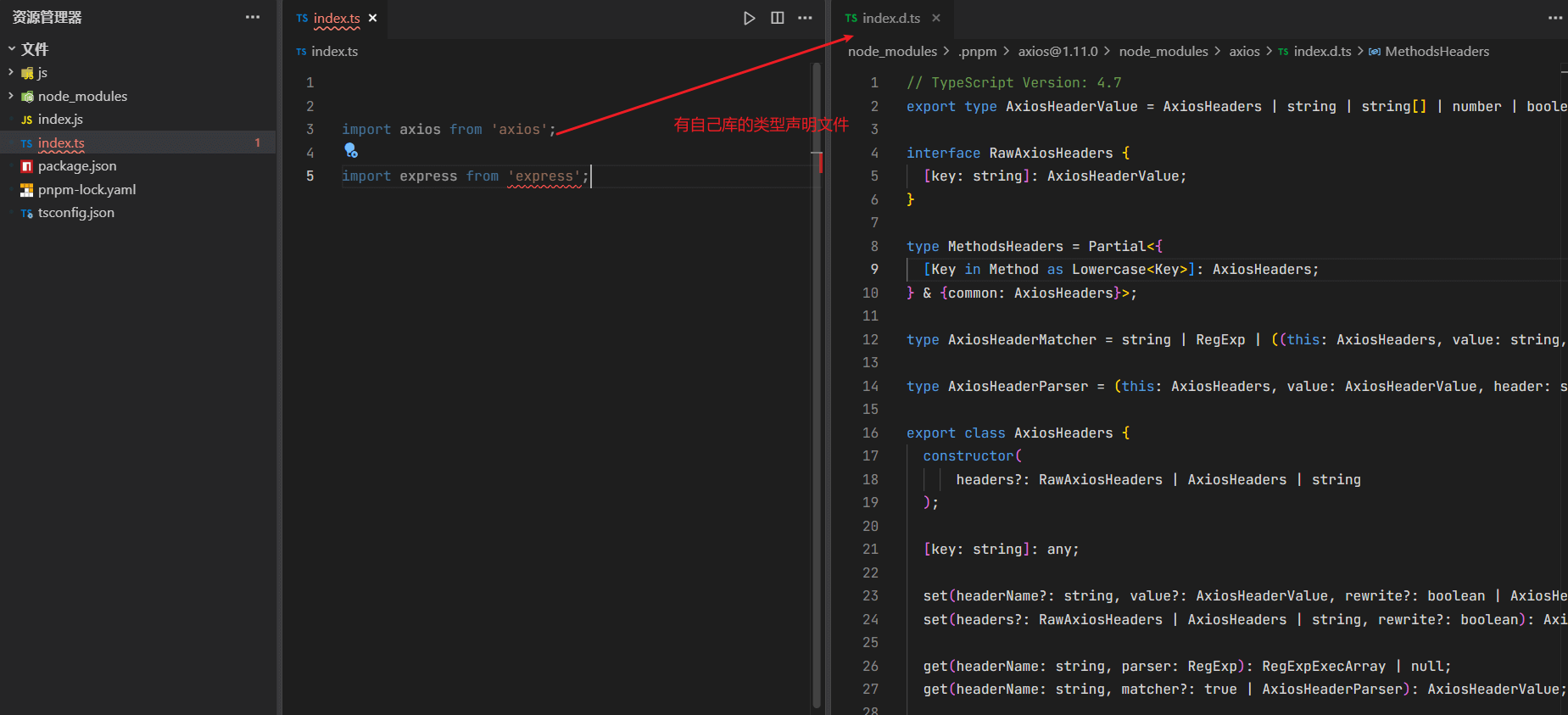
下面 asiox 这个第三方库有类型声明文件,直接在 ts 中引入不会报错,但是 express 库却没有声明文件,所以直接报错了,
如图:
解决方式
方式一:尝试使用 npm i --save-dev @types/express (如果存在)
方式二:或者添加一个包含 declare module 'express'; 的新声明(.d.ts)文件
我们使用方式二解决:
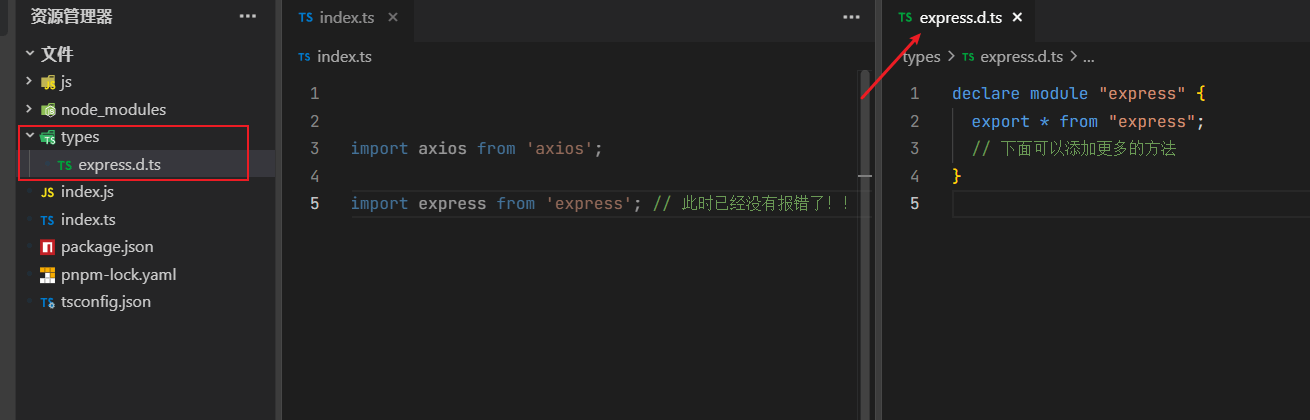
我们需要在项目根目录下创建一个 types 文件夹,然后在 types 文件夹下创建一个 express.d.ts 文件,文件内容如下:
typescript
declare module "express" {
  export * from "express";
  // 下面可以添加更多的方法声明
}如图已解决:
一、声明文件基础
1. 文件类型
- .ts:包含实现和类型的 TypeScript 文件
- .d.ts:纯类型声明文件(不包含实现)
2. 文件作用
- 为现有 JavaScript 代码添加类型支持
- 描述第三方库的类型
- 共享项目内的类型定义
二、声明语法
1. 变量声明
typescript
declare const version: string;2. 函数声明
typescript
declare function greet(name: string): void;3. 类声明
typescript
declare class Person {
  constructor(name: string);
  getName(): string;
}4. 接口声明
typescript
declare interface User {
  id: number;
  name: string;
}5. 类型别名
typescript
declare type ID = string | number;三、模块声明
1. 普通模块声明
typescript
declare module "module-name" {
  export const version: string;
  export function doSomething(): void;
}2. 全局扩展
typescript
declare global {
  interface Window {
    myCustomProp: number;
  }
}3. 第三方库类型
typescript
declare module "some-library" {
  export = someLibrary; // 整个模块导出
}四、常见使用场景
1. 为第三方库添加类型
typescript
// jquery.d.ts
declare const $: {
  (selector: string): JQuery;
  ajax(url: string): Promise<any>;
};

interface JQuery {
  text(content?: string): this;
  on(event: string, handler: Function): this;
}2. 扩展现有类型
typescript
// 扩展Express的Request类型
declare namespace Express {
  interface Request {
    user?: {
      id: string;
      name: string;
    };
  }
}3. 快速声明
typescript
// 为没有类型的JS文件快速声明
declare module "*.svg" {
  const content: string;
  export default content;
}五、声明文件位置
1. 项目内声明
src/types/目录@types/目录- 与实现文件同名的
.d.ts文件
2. 全局声明
global.d.ts(自动包含在项目中)types字段在tsconfig.json中指定
六、最佳实践
- 优先使用
interface而非type(便于扩展) - 避免使用
any(失去类型检查意义) - 保持声明最小化(只声明必要的部分)
- 合理使用
declare(仅用于声明环境类型) - 模块导出保持一致(与实现保持一致)
七、自动生成声明
通过 tsc 编译器自动生成:
bash
tsc --declaration --emitDeclarationOnly或在 tsconfig.json 中配置:
json
{
  "compilerOptions": {
    "declaration": true,
    "emitDeclarationOnly": true
  }
}八、常见问题解决
1. 模块找不到声明
typescript
// 临时解决方案
declare module "some-untyped-module";2. 类型冲突
typescript
// 使用类型断言
const element = document.getElementById("foo") as HTMLElement;3. 全局污染
typescript
// 使用模块导出替代全局声明
export declare const globalVar: string;声明文件是 TypeScript 生态系统的关键部分,良好的类型声明可以显著提升代码质量和开发体验。