
Next.js 中的 Layout(页面布局)
更新: 9/26/2025字数: 0 字 时长: 0 分钟
1. 什么是 Layout?
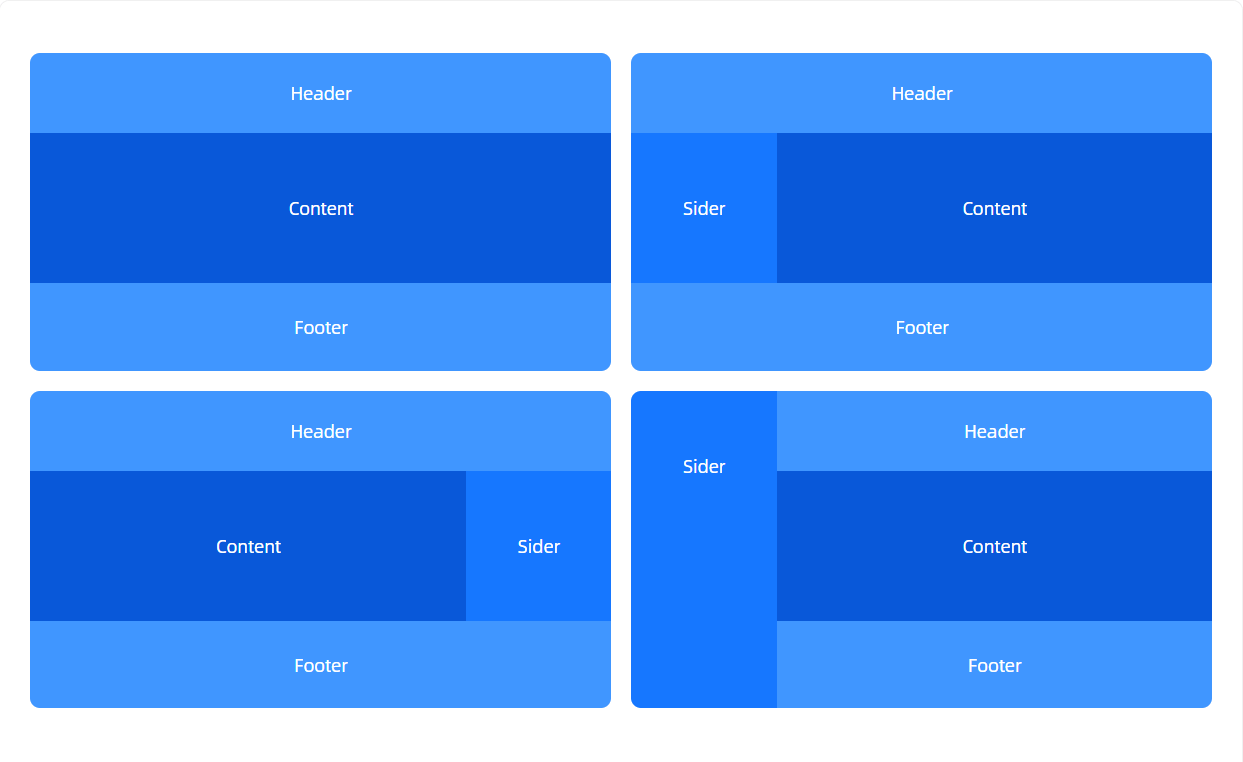
在实际项目中,很多页面共享同一个框架,比如:
- 顶部导航栏(Header)
- 侧边栏(Sidebar)
- 底部信息(Footer)
如果每个页面都重复写这些代码,会非常麻烦。 Layout 就是 Next.js 提供的一种“页面骨架”,用来统一管理这些共享 UI。
如图所示:
2. 在 Next.js 中的使用方式
(1)App Router(app/目录)
在 Next.js 13+(包括 15)推荐使用 App Router,它自带 layout.tsx 文件来做布局。
例如目录结构:
app/
 ├─ layout.tsx
 ├─ page.tsx
 ├─ dashboard/
 │   ├─ layout.tsx
│ └─ page.tsxapp/layout.tsx定义应用的全局布局,所有页面都会被包裹。tsx// app/layout.tsx export default function RootLayout({ children }: { children: React.ReactNode }) { return ( <html lang="en"> <body> <header>全局导航栏</header> <main>{children}</main> <footer>全局底部</footer> </body> </html> ); }app/page.tsx首页的内容会自动放到<main>{children}</main>里。app/dashboard/layout.tsx给dashboard/下的页面单独定义一个布局(比如多加个侧边栏)。tsx// app/dashboard/layout.tsx export default function DashboardLayout({ children }: { children: React.ReactNode }) { return ( <section> <aside>侧边栏</aside> <div>{children}</div> </section> ); }
👉 这样,/dashboard/page.tsx 就会自动嵌套在 DashboardLayout 内,而 DashboardLayout 又嵌套在全局 RootLayout 内。
(2)Pages Router(pages/目录)
如果你还在用老版本(Next.js 12 或以下),可以自己写一个 Layout 组件,然后在 _app.tsx 中包裹。
tsx
// components/Layout.tsx
export default function Layout({ children }: { children: React.ReactNode }) {
  return (
    <div>
      <header>导航栏</header>
      <main>{children}</main>
      <footer>底部</footer>
    </div>
  );
}tsx
// pages/_app.tsx
import Layout from "@/components/Layout";

export default function MyApp({ Component, pageProps }) {
  return (
    <Layout>
      <Component {...pageProps} />
    </Layout>
  );
}这样所有页面都会套用 Layout。
如果某个页面需要自定义 Layout,可以用 getLayout 模式:
tsx
// pages/dashboard.tsx
const Dashboard = () => <div>Dashboard 内容</div>;

Dashboard.getLayout = function getLayout(page) {
  return (
    <Layout>
      <Sidebar />
      {page}
    </Layout>
  );
};

export default Dashboard;然后在 _app.tsx 中:
tsx
export default function MyApp({ Component, pageProps }) {
  const getLayout = Component.getLayout || ((page) => page);
  return getLayout(<Component {...pageProps} />);
}3. 特点和应用场景
特点
- 可嵌套:子目录的
layout.tsx会叠加在父级布局之上。 - 持久化(Persistent):切换页面时,
layout.tsx不会被重新渲染,只更新children部分。 - 支持异步:Layout 也可以是异步函数(比如请求菜单数据)。
应用场景
- 全局统一框架(导航栏 + Footer)
- 某些模块(如
dashboard/)需要独立的侧边栏 - 公共状态(比如登录信息、主题)可以放在 Layout 中共享