
获取本地时区与公网 IP 的实用方法
更新: 8/20/2026字数: 0 字 时长: 0 分钟
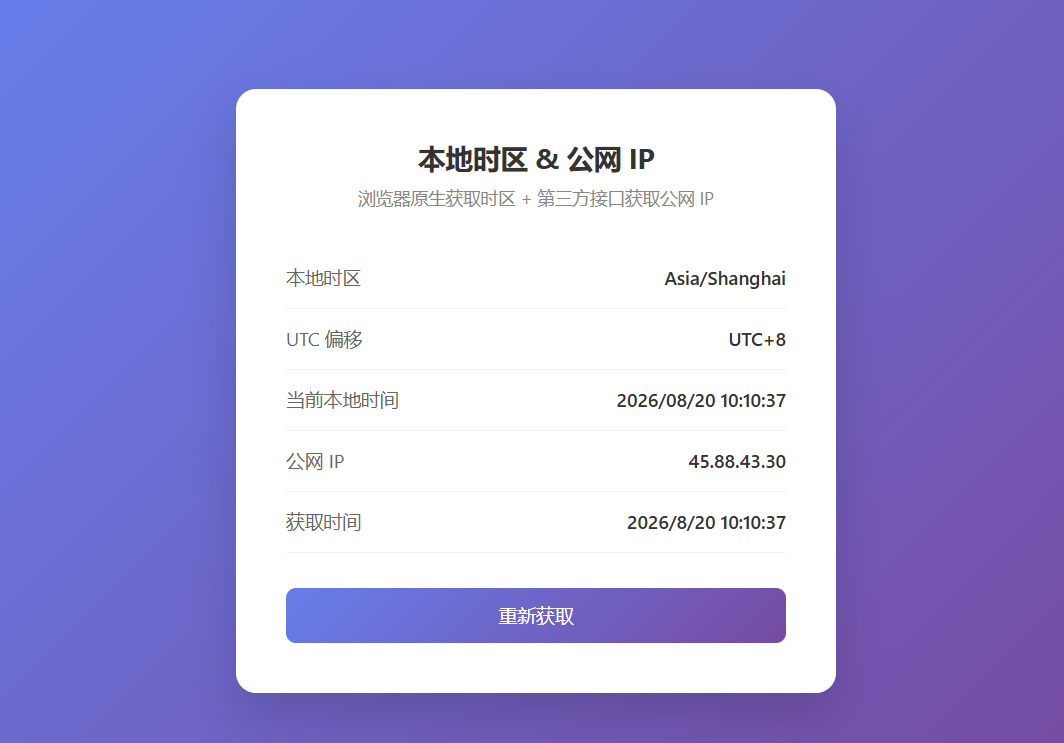
在前端开发中,经常需要获取用户的本地时区和公网 IP。前者用于时间展示与本地化,后者常用于日志、风控、地理位置相关功能。本文介绍浏览器环境下最常用、最稳定的获取方式,并提供可直接运行的完整 HTML 案例。
一、获取本地时区
浏览器原生提供了可靠的时区信息,无需第三方接口。
1. 推荐方式:IANA 时区名称
js
const timeZone = Intl.DateTimeFormat().resolvedOptions().timeZone;
console.log(timeZone); // 例如 "Asia/Shanghai"、"America/New_York"2. 获取时区偏移量(分钟)
js
const offset = new Date().getTimezoneOffset();
console.log(offset); // 例如 -480 表示 UTC+8注意:返回值是 UTC 减去本地时间的分钟数。
- 正数:本地时间落后于 UTC
- 负数:本地时间领先于 UTC
转换为小时可读形式:
js
const offsetHours = -new Date().getTimezoneOffset() / 60;
console.log(`UTC${offsetHours >= 0 ? '+' : ''}${offsetHours}`);
// 输出示例:UTC+8二、获取公网 IP
浏览器无法直接读取公网 IP,需要请求外部接口。推荐使用免费且支持 CORS 的接口:
js
async function getPublicIP() {
  const res = await fetch('https://api.ipify.org?format=json');
  const data = await res.json();
  return data.ip;
}其他可用接口:
https://api.ipsimple.org/ipv4?format=jsonhttps://api.ip.sb/jsonip
三、完整 HTML 案例(可直接运行)
将下面代码保存为 index.html,用浏览器打开即可查看效果:
html
<!DOCTYPE html>
<html lang="zh-CN">
<head>
  <meta charset="UTF-8">
  <meta name="viewport" content="width=device-width, initial-scale=1.0">
  <title>获取本地时区与公网 IP</title>
  <style>
    * {
      margin: 0;
      padding: 0;
      box-sizing: border-box;
    }
    body {
      font-family: -apple-system, BlinkMacSystemFont, "Segoe UI", Roboto, "Helvetica Neue", Arial, sans-serif;
      background: linear-gradient(135deg, #667eea 0%, #764ba2 100%);
      min-height: 100vh;
      display: flex;
      justify-content: center;
      align-items: center;
      padding: 20px;
    }
    .card {
      background: #fff;
      border-radius: 16px;
      box-shadow: 0 20px 40px rgba(0, 0, 0, 0.15);
      padding: 40px;
      max-width: 480px;
      width: 100%;
    }
    h1 {
      font-size: 22px;
      color: #333;
      margin-bottom: 8px;
      text-align: center;
    }
    .subtitle {
      text-align: center;
      color: #888;
      font-size: 14px;
      margin-bottom: 30px;
    }
    .item {
      display: flex;
      justify-content: space-between;
      align-items: center;
      padding: 14px 0;
      border-bottom: 1px solid #f0f0f0;
    }
    .item:last-child {
      border-bottom: none;
    }
    .label {
      color: #666;
      font-size: 15px;
    }
    .value {
      font-weight: 600;
      color: #333;
      font-size: 15px;
      word-break: break-all;
      text-align: right;
      max-width: 60%;
    }
    .value.loading {
      color: #999;
      font-weight: normal;
    }
    .value.error {
      color: #e74c3c;
    }
    .btn {
      display: block;
      width: 100%;
      margin-top: 28px;
      padding: 12px;
      background: linear-gradient(135deg, #667eea 0%, #764ba2 100%);
      color: #fff;
      border: none;
      border-radius: 8px;
      font-size: 15px;
      cursor: pointer;
      transition: opacity 0.2s;
    }
    .btn:hover {
      opacity: 0.9;
    }
    .btn:disabled {
      opacity: 0.6;
      cursor: not-allowed;
    }
  </style>
</head>
<body>
  <div class="card">
    <h1>本地时区 & 公网 IP</h1>
    <p class="subtitle">浏览器原生获取时区 + 第三方接口获取公网 IP</p>

    <div class="item">
      <span class="label">本地时区</span>
      <span class="value" id="timezone">获取中...</span>
    </div>
    <div class="item">
      <span class="label">UTC 偏移</span>
      <span class="value" id="offset">获取中...</span>
    </div>
    <div class="item">
      <span class="label">当前本地时间</span>
      <span class="value" id="localTime">获取中...</span>
    </div>
    <div class="item">
      <span class="label">公网 IP</span>
      <span class="value loading" id="publicIP">获取中...</span>
    </div>
    <div class="item">
      <span class="label">获取时间</span>
      <span class="value" id="fetchTime">-</span>
    </div>

    <button class="btn" id="refreshBtn" onclick="loadInfo()">重新获取</button>
  </div>

  <script>
    // 获取本地时区信息
    function getTimeInfo() {
      const now = new Date();
      const timeZone = Intl.DateTimeFormat().resolvedOptions().timeZone;
      const offsetMinutes = now.getTimezoneOffset();
      const offsetHours = -offsetMinutes / 60;
      const utcOffset = `UTC${offsetHours >= 0 ? '+' : ''}${offsetHours}`;

      return {
        timeZone,
        utcOffset,
        localTime: now.toLocaleString('zh-CN', {
          year: 'numeric',
          month: '2-digit',
          day: '2-digit',
          hour: '2-digit',
          minute: '2-digit',
          second: '2-digit',
          hour12: false
        })
      };
    }

    // 获取公网 IP(带多个备用接口)
    async function getPublicIP() {
      const apis = [
        'https://api.ipify.org?format=json',
        'https://api.ipsimple.org/ipv4?format=json',
        'https://api.ip.sb/jsonip'
      ];

      for (const url of apis) {
        try {
          const controller = new AbortController();
          const timer = setTimeout(() => controller.abort(), 4000);

          const res = await fetch(url, { signal: controller.signal });
          clearTimeout(timer);

          if (!res.ok) continue;
          const data = await res.json();
          const ip = data.ip || data.query;
          if (ip) return ip;
        } catch (e) {
          // 继续尝试下一个接口
        }
      }
      throw new Error('所有接口均不可用');
    }

    // 加载并展示信息
    async function loadInfo() {
      const btn = document.getElementById('refreshBtn');
      const ipEl = document.getElementById('publicIP');

      btn.disabled = true;
      ipEl.className = 'value loading';
      ipEl.textContent = '获取中...';

      // 1. 本地时区(同步,立即显示)
      const timeInfo = getTimeInfo();
      document.getElementById('timezone').textContent = timeInfo.timeZone;
      document.getElementById('offset').textContent = timeInfo.utcOffset;
      document.getElementById('localTime').textContent = timeInfo.localTime;
      document.getElementById('fetchTime').textContent = new Date().toLocaleString('zh-CN');

      // 2. 公网 IP(异步)
      try {
        const ip = await getPublicIP();
        ipEl.className = 'value';
        ipEl.textContent = ip;
      } catch (err) {
        ipEl.className = 'value error';
        ipEl.textContent = '获取失败';
        console.error(err);
      }

      btn.disabled = false;
    }

    // 页面加载时自动获取
    loadInfo();
  </script>
</body>
</html>案例说明
- 本地时区:使用
Intl.DateTimeFormat().resolvedOptions().timeZone获取标准 IANA 时区名称。 - UTC 偏移:通过
getTimezoneOffset()计算。 - 公网 IP:依次尝试多个免费接口,带超时控制,提高成功率。
- 界面:简洁卡片式布局,支持一键刷新。
直接复制保存为 HTML 文件,用浏览器打开即可看到效果。