
IntersectionObserver:现代 Web 的智能元素观察者
更新: 5/20/2026字数: 0 字 时长: 0 分钟
一、为什么需要 IntersectionObserver?
在传统的 Web 开发中,要实现"元素进入视口"检测,通常需要:
- 监听
scroll事件 - 在事件处理程序中循环检查每个元素的位置
- 使用
getBoundingClientRect()计算元素位置
这种方法存在明显问题:
- 性能开销大:滚动事件触发频繁,容易造成性能瓶颈
- 布局抖动:频繁读取布局属性导致浏览器反复重排
- 代码复杂:需要手动计算各种边界情况
IntersectionObserver 完美解决了这些问题!
什么是 IntersectionObserver?
IntersectionObserver 是一个现代的浏览器 API,它提供了一种高效、异步的方法来检测目标元素与祖先元素或视口(viewport)的交叉状态(intersection)变化。
当其监听到目标元素的可见部分(的比例)超过了一个或多个阈值(threshold)时,会执行指定的回调函数。
二、基本用法
2.1 创建观察者
javascript
const observer = new IntersectionObserver(callback, options);2.2 观察目标元素
javascript
const target = document.getElementById("target");
observer.observe(target);2.3 停止观察
javascript
// 停止观察特定元素
observer.unobserve(target);

// 停止所有观察并销毁观察者
observer.disconnect();2.4 配置选项
IntersectionObserver 接受一个配置对象:
javascript
const options = {
  root: null, // 根元素,null表示视口
  rootMargin: "0px", // 根元素的外边距
  threshold: 0.5 // 交叉比例的阈值
};2.5 threshold 详解
0:目标刚进入/离开根元素时触发1:目标完全进入根元素时触发[0, 0.25, 0.5, 0.75, 1]:在多个比例点触发
2.6 回调函数
当观察的元素交叉状态发生变化时,会触发回调函数:
javascript
function callback(entries, observer) {
  entries.forEach((entry) => {
    // entry提供目标元素的交叉信息
    console.log(entry.isIntersecting); // 是否交叉
    console.log(entry.intersectionRatio); // 交叉比例
  });
}三、IntersectionObserver 的优势
- 高性能:异步执行,不阻塞主线程
- 精确控制:可配置阈值和根元素
- 简化代码:无需手动计算元素位置
- 节能:非激活状态的标签页会自动暂停检测
四、实际应用场景和案例
- 懒加载:图片、视频等资源进入视口时再加载
- 无限滚动:检测何时需要加载更多内容
- 动画触发:元素进入视口时执行动画
- 广告曝光统计:统计广告是否被用户看到
- 阅读进度指示:跟踪用户在页面中的阅读进度
4.1 图片懒加载示例
实现效果:
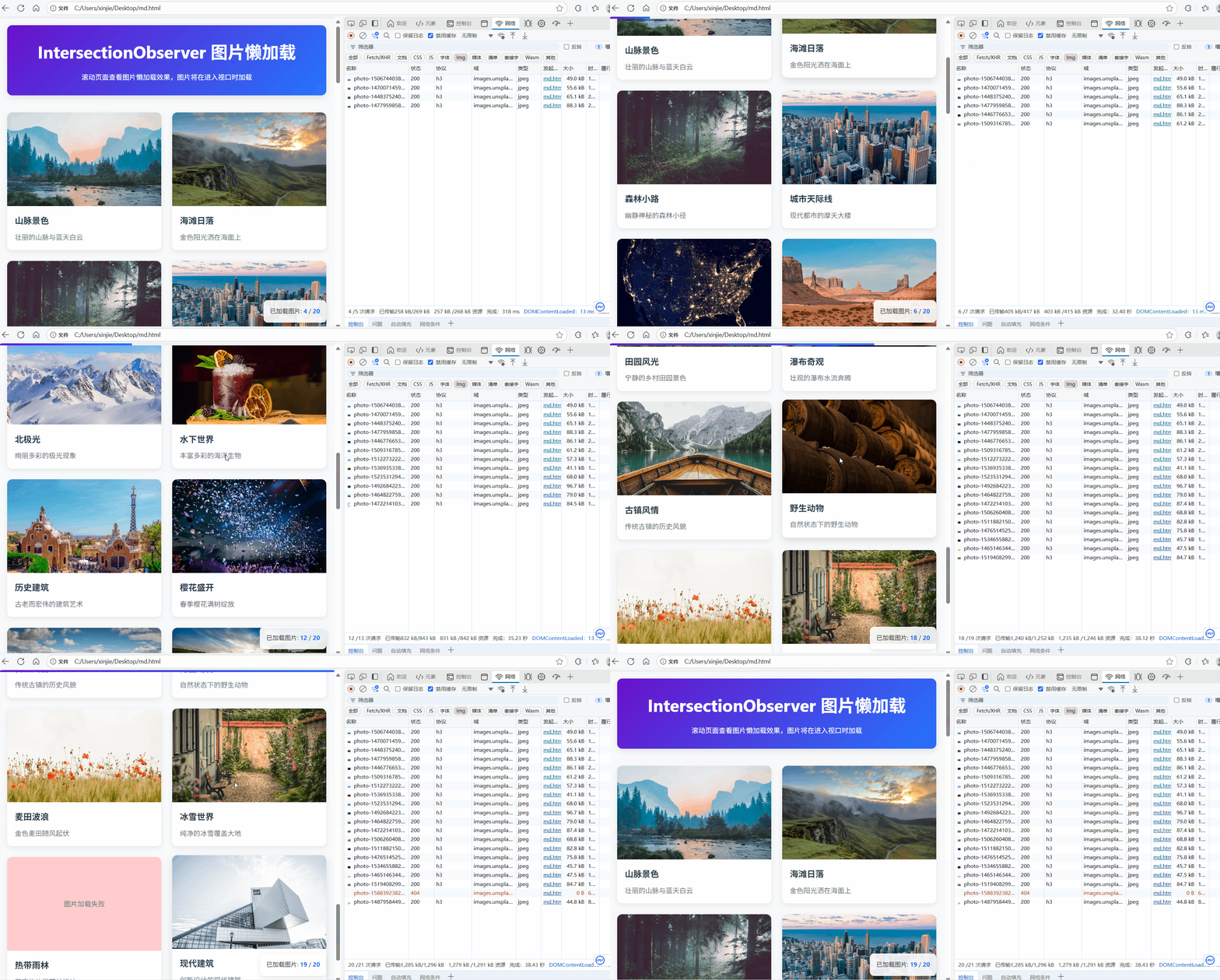
代码如下:
html
<!DOCTYPE html>
<html lang="zh-CN">
  <head>
    <meta charset="UTF-8" />
    <meta name="viewport" content="width=device-width, initial-scale=1.0" />
    <title>IntersectionObserver - 图片懒加载优化</title>
    <style>
      * {
        margin: 0;
        padding: 0;
        box-sizing: border-box;
      }

      body {
        font-family: "Segoe UI", Tahoma, Geneva, Verdana, sans-serif;
        line-height: 1.6;
        color: #333;
        background-color: #f8f9fa;
        padding: 20px;
      }

      .container {
        max-width: 1200px;
        margin: 0 auto;
      }

      header {
        text-align: center;
        margin-bottom: 40px;
        padding: 30px;
        background: linear-gradient(135deg, #6a11cb 0%, #2575fc 100%);
        color: white;
        border-radius: 12px;
        box-shadow: 0 5px 15px rgba(0, 0, 0, 0.1);
      }

      h1 {
        font-size: 2.5rem;
        margin-bottom: 15px;
      }

      .intro {
        max-width: 800px;
        margin: 0 auto 30px;
        font-size: 1.1rem;
        line-height: 1.8;
      }

      .image-grid {
        display: grid;
        grid-template-columns: repeat(auto-fill, minmax(300px, 1fr));
        gap: 25px;
        margin-bottom: 40px;
      }

      .image-item {
        background: #fff;
        border-radius: 12px;
        overflow: hidden;
        box-shadow: 0 4px 12px rgba(0, 0, 0, 0.08);
        transition: transform 0.3s ease, box-shadow 0.3s ease;
      }

      .image-item:hover {
        transform: translateY(-5px);
        box-shadow: 0 8px 20px rgba(0, 0, 0, 0.12);
      }

      .lazy-image {
        width: 100%;
        height: 220px;
        background-color: #e9ecef;
        display: flex;
        align-items: center;
        justify-content: center;
        color: #6c757d;
        font-size: 1rem;
        overflow: hidden;
        transition: all 0.5s ease;
      }

      .lazy-image img {
        width: 100%;
        height: 100%;
        object-fit: cover;
        opacity: 0;
        transition: opacity 0.7s ease;
      }

      .lazy-image.loaded {
        background-color: transparent;
      }

      .lazy-image.loaded img {
        opacity: 1;
      }

      .image-info {
        padding: 18px;
      }

      .image-info h3 {
        font-size: 1.25rem;
        margin-bottom: 10px;
        color: #2c3e50;
      }

      .image-info p {
        color: #6c757d;
        line-height: 1.6;
      }

      .progress-container {
        position: fixed;
        top: 0;
        left: 0;
        width: 100%;
        height: 5px;
        background-color: #f0f0f0;
        z-index: 1000;
      }

      .progress-bar {
        height: 100%;
        width: 0%;
        background: linear-gradient(90deg, #6a11cb, #2575fc);
        transition: width 0.25s ease;
      }

      .stats {
        position: fixed;
        bottom: 20px;
        right: 20px;
        background: rgba(255, 255, 255, 0.9);
        padding: 15px;
        border-radius: 10px;
        box-shadow: 0 4px 12px rgba(0, 0, 0, 0.1);
        font-size: 0.9rem;
      }

      .stats span {
        font-weight: bold;
        color: #2575fc;
      }

      footer {
        text-align: center;
        padding: 30px;
        margin-top: 50px;
        color: #6c757d;
        border-top: 1px solid #e9ecef;
      }

      @media (max-width: 768px) {
        .image-grid {
          grid-template-columns: 1fr;
        }

        h1 {
          font-size: 2rem;
        }
      }
    </style>
  </head>
  <body>
    <div class="progress-container">
      <div class="progress-bar" id="progressBar"></div>
    </div>

    <div class="container">
      <header>
        <h1>IntersectionObserver 图片懒加载</h1>
        <p>滚动页面查看图片懒加载效果,图片将在进入视口时加载</p>
      </header>

      <div class="image-grid" id="imageContainer">
        <!-- 图片将由JavaScript动态生成 -->
      </div>

      <div class="stats">已加载图片: <span id="loadedCount">0</span> / <span id="totalCount">0</span></div>
    </div>

    <footer>
      <p>IntersectionObserver API 演示 - 图片懒加载优化示例</p>
    </footer>

    <script>
      // 图片数据
      const imageData = [
        { id: 1, title: "山脉景色", description: "壮丽的山脉与蓝天白云", url: "https://images.unsplash.com/photo-1506744038136-46273834b3fb" },
        { id: 2, title: "海滩日落", description: "金色阳光洒在海面上", url: "https://images.unsplash.com/photo-1470071459604-3b5ec3a7fe05" },
        { id: 3, title: "森林小路", description: "幽静神秘的森林小径", url: "https://images.unsplash.com/photo-1448375240586-882707db888b" },
        { id: 4, title: "城市天际线", description: "现代都市的摩天大楼", url: "https://images.unsplash.com/photo-1477959858617-67f85cf4f1df" },
        { id: 5, title: "星空银河", description: "璀璨星空与银河系", url: "https://images.unsplash.com/photo-1446776653964-20c1d3a81b06" },
        { id: 6, title: "沙漠风光", description: "一望无际的沙漠景观", url: "https://images.unsplash.com/photo-1509316785289-025f5b846b35" },
        { id: 7, title: "北极光", description: "绚丽多彩的极光现象", url: "https://images.unsplash.com/photo-1512273222628-4daea6e55abb" },
        { id: 8, title: "水下世界", description: "丰富多彩的海洋生物", url: "https://images.unsplash.com/photo-1536935338788-846bb9981813" },
        { id: 9, title: "历史建筑", description: "古老而宏伟的建筑艺术", url: "https://images.unsplash.com/photo-1523531294919-4bcd7c65e216" },
        { id: 10, title: "樱花盛开", description: "春季樱花满树绽放", url: "https://images.unsplash.com/photo-1492684223066-81342ee5ff30" },
        { id: 11, title: "雪山巅峰", description: "白雪覆盖的高山巅峰", url: "https://images.unsplash.com/photo-1464822759023-fed622ff2c3b" },
        { id: 12, title: "湖畔倒影", description: "平静湖面映出美丽倒影", url: "https://images.unsplash.com/photo-1472214103451-9374bd1c798e" },
        { id: 13, title: "田园风光", description: "宁静的乡村田园景色", url: "https://images.unsplash.com/photo-1506260408121-e353d10b87c7" },
        { id: 14, title: "瀑布奇观", description: "壮观的瀑布水流奔腾", url: "https://images.unsplash.com/photo-1511882150382-421056c89033" },
        { id: 15, title: "古镇风情", description: "传统古镇的历史风貌", url: "https://images.unsplash.com/photo-1476514525535-07fb3b4ae5f1" },
        { id: 16, title: "野生动物", description: "自然状态下的野生动物", url: "https://images.unsplash.com/photo-1534655882117-f9eff36a1574" },
        { id: 17, title: "麦田波浪", description: "金色麦田随风起伏", url: "https://images.unsplash.com/photo-1465146344425-f00d5f5c8f07" },
        { id: 18, title: "冰雪世界", description: "纯净的冰雪覆盖大地", url: "https://images.unsplash.com/photo-1519408299519-b7a0274f7d67" },
        { id: 19, title: "热带雨林", description: "茂密的热带雨林植被", url: "https://images.unsplash.com/photo-1588392382834-a891154bca4d" },
        { id: 20, title: "现代建筑", description: "创新设计的现代建筑", url: "https://images.unsplash.com/photo-1487958449943-2429e8be8625" }
      ];

      // 初始化变量
      let loadedImages = 0;
      const totalImages = imageData.length;
      let imageObserver;

      // 更新统计信息
      function updateStats() {
        document.getElementById("loadedCount").textContent = loadedImages;
        document.getElementById("totalCount").textContent = totalImages;
      }

      // 初始化图片网格
      function initImageGrid() {
        const container = document.getElementById("imageContainer");

        imageData.forEach((item) => {
          const imageItem = document.createElement("div");
          imageItem.className = "image-item";

          // 创建图片占位符
          const imageDiv = document.createElement("div");
          imageDiv.className = "lazy-image";
          imageDiv.setAttribute("data-id", item.id);
          imageDiv.innerHTML = `<div>点击加载图片 ${item.id}</div>`;

          // 添加点击手动加载功能
          imageDiv.addEventListener("click", function () {
            if (!this.classList.contains("loaded")) {
              loadImage(this, item.url);
            }
          });

          // 创建图片信息区域
          const infoDiv = document.createElement("div");
          infoDiv.className = "image-info";
          infoDiv.innerHTML = `
                    <h3>${item.title}</h3>
                    <p>${item.description}</p>
                `;

          imageItem.appendChild(imageDiv);
          imageItem.appendChild(infoDiv);
          container.appendChild(imageItem);
        });

        updateStats();
      }

      // 加载图片
      function loadImage(element, url) {
        const img = new Image();

        img.onload = function () {
          element.innerHTML = "";
          element.appendChild(img);
          element.classList.add("loaded");
          loadedImages++;
          updateStats();

          // 停止观察已加载的图片
          imageObserver.unobserve(element);
        };

        img.onerror = function () {
          element.innerHTML = "<div>图片加载失败</div>";
          element.style.backgroundColor = "#ffcccc";
        };

        img.src = `${url}?w=600&h=400&fit=crop`;
      }

      // 初始化IntersectionObserver
      function initObserver() {
        imageObserver = new IntersectionObserver(
          (entries, observer) => {
            entries.forEach((entry) => {
              if (entry.isIntersecting) {
                const imageElement = entry.target;
                const id = imageElement.getAttribute("data-id");
                const imageInfo = imageData.find((item) => item.id == id);

                if (imageInfo && !imageElement.classList.contains("loaded")) {
                  loadImage(imageElement, imageInfo.url);
                }
              }
            });
          },
          {
            rootMargin: "50px", // 提前50px开始加载
            threshold: 0.01
          }
        );

        // 开始观察所有图片元素
        document.querySelectorAll(".lazy-image").forEach((image) => {
          imageObserver.observe(image);
        });
      }

      // 初始化滚动进度条
      function initProgressBar() {
        const progressBar = document.getElementById("progressBar");

        window.addEventListener("scroll", () => {
          const windowHeight = window.innerHeight;
          const documentHeight = document.documentElement.scrollHeight - windowHeight;
          const scrollPosition = window.scrollY;
          const progress = (scrollPosition / documentHeight) * 100;

          progressBar.style.width = `${progress}%`;
        });
      }

      // 页面加载完成后初始化
      document.addEventListener("DOMContentLoaded", () => {
        initImageGrid();
        initObserver();
        initProgressBar();
      });
    </script>
  </body>
</html>4.2 用户消息顶部粘性定位
当前实现的功能是用户消息的粘性定位实现。
当用户滚动时,当前消息的底部与下一个消息的顶部相交时,移除上一个消息的粘性效果,并为当前消息添加粘性效果。依次交替实现。
效果如下:

主要代码如下:
js
.  /** 当用户滚动时,当前消息的底部与下一个消息的顶部相交时,移除上一个消息的粘性效果,并为当前消息添加粘性效果。依次交替实现。 */
  useEffect(() => {

    if (isMobile) return;

    const observers: IntersectionObserver[] = [];

    // 获取所有 AI 消息元素
    const aiMessages = document.querySelectorAll(".message-ai");
    aiMessages.forEach((aiMessage) => {
      // 获取前一个用户消息元素
      const prevUserMessage = aiMessage.previousElementSibling;
      if (!prevUserMessage || !prevUserMessage.classList.contains("message-user")) {
        return;
      }

      // 计算用户消息的高度 50是消除之间的间隔
      const userChatHeight = prevUserMessage.clientHeight - 50;

      // 创建独立的 IntersectionObserver
      const observer = new IntersectionObserver(
        (entries) => {
          entries.forEach((entry) => {
            if (entry.isIntersecting) {
              prevUserMessage.classList.add("sticky-user-chat");
            } else {
              prevUserMessage.classList.remove("sticky-user-chat");
            }
          });
        },
        {
          root: chatContainerRef.current,
          rootMargin: `-${userChatHeight}px 0px 0px 0px`, // 动态设置
          threshold: [0, 1] // 离开时触发顺序相反
        }
      );

      observer.observe(aiMessage);
      observers.push(observer); // 存储观察者以便清理
    });

    return () => {
      observers.forEach((observer) => observer.disconnect());
    };
  }, [chatHistory, isMobile]);